Why am I unable to copy a universal link? When I hook a document, right-click, and hold down the ‘Option’ key to click ‘Copy As Universal Link,’ nothing gets copied. It only works when I select a portion of text within the document or when I hook a file and select its name. In those cases, I can use ‘Copy Selection and Link’ to copy the selected text along with the universal link.
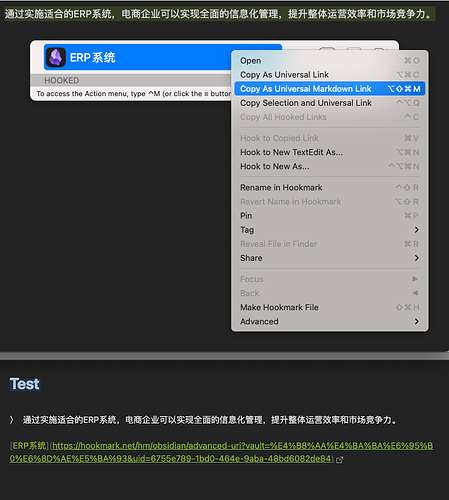
Are you using a clipboard manager? If so, can you try turning it off to see if it makes a difference?
Hi, new user here (still in trial period), and I’m having a similar issue. I’ve turned off Alfred (clipboard manager) but frankly I’m starting to wonder if I have another app maybe that’s interfering with clipboard.
I’m trying to create a link to the file ‘cardew - treatise-handbook.pdf’ and paste it in Notion, so I want a universal link. But like the user above, when I highlight the file and click ‘copy as universal link’ (or the markdown version’, nothing is copied. It’s only if (in Skim) I do ‘copy selection and universal link’ that it works. Below is the results when I tried different copy commands:
copy link

hook://file/F8WXQqUZH?p=c2NvdHRtY2xhdWdobGluL0Rvd25sb2Fkcw==&n=cardew%20%2D%20treatise%2Dhandbook%2Epdf

Copy as Markdown link

[cardew - treatise-handbook.pdf](hook://file/F8WXQqUZH?p=c2NvdHRtY2xhdWdobGluL0Rvd25sb2Fkcw==&n=cardew%20%2D%20treatise%2Dhandbook%2Epdf)

Copy as universal link

[cardew - treatise-handbook.pdf](hook://file/F8WXQqUZH?p=c2NvdHRtY2xhdWdobGluL0Rvd25sb2Fkcw==&n=cardew%20%2D%20treatise%2Dhandbook%2Epdf)

Copy as universal Markdown link

[cardew - treatise-handbook.pdf](hook://file/F8WXQqUZH?p=c2NvdHRtY2xhdWdobGluL0Rvd25sb2Fkcw==&n=cardew%20%2D%20treatise%2Dhandbook%2Epdf)
and if I open the file in Skim and select some text then use ‘copy selection and universal link’ I get
> Cornelius Cardew
TREATISE HANDBOOK
[cardew - treatise-handbook.pdf](https://hookmark.net/hm/hook/file/F8WXQqUZH?p=c2NvdHRtY2xhdWdobGluL0Rvd25sb2Fkcw==&n=cardew%20%2D%20treatise%2Dhandbook%2Epdf#p=1&x=0&y=0&s=2&e=35)
I’m sure it’s just not copying because if I simply copy some random text into clipboard then try the same universal link operations described above, when I then try to paste I just get the random text, which is still in the clipboard: as though the HookMark copy commands didn’t run.
any suggestions?
best,
Scott
Sorry about this issue, @scottmclaughlin .
I haven’t been able to reproduce the problem yet.
If you do “Copy as universal link” in Skim, does it work?
Do you use keyboard shortcut or click the menu item?
If you copy some ramdom text first, then do “Copy link”, does it work?
Thank you
Thanks, I tried both those things with no success. Nothing was copied to the clipboard.
I also tried looking in the OS keyboard shortcuts in case there was a clash with a system-wide shortcut but I don’t see any, nor in Skim.
I can only assume there’s some app that’s using modifying my clipboard. I turned off Alfred which was the obvious one but maybe there’s another I’ve forgotten. I don’t suppose you have a list of apps that can interfere?
In case it’s useful, this is an M1 macbook running Sonoma 14.6.1