Apologies if this has already been addressed. I’m trying to bookmark web pages. I click on the URL of the page, invoke Hookmark and then cmd-d to bookmark it without copying. However, it only works on occasion.
Thank you for any suggestions
MM
Apologies if this has already been addressed. I’m trying to bookmark web pages. I click on the URL of the page, invoke Hookmark and then cmd-d to bookmark it without copying. However, it only works on occasion.
Thank you for any suggestions
MM
I should have added:
I’m using Hookmark 7.2.1 and MacOS 26.5.2
MM
Thank you for contacting us and sorry about the issue, @MLMarrin .
Do you mean you have to do multiple cmd-d to make it work or it does not work for some particular web sites?
I will try to reproduce the issue.
Thank you
Thanks for the quick response.
The issue seems to be inconsistency. I’ve been able to bookmark some websites, but not others, and no pattern to it is apparent. I tried invoking HM, then copying a link, but that doesn’t work consistently either.
MM
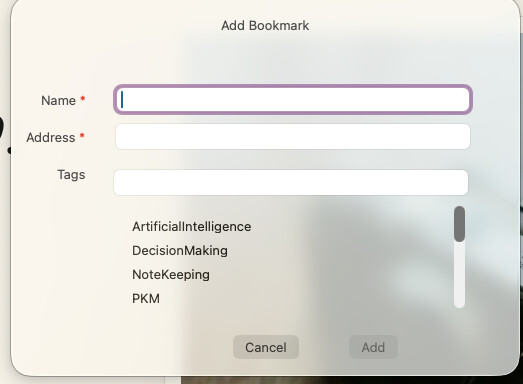
I just tried invoking HM, then cmd-D (capital D instead of lower case). This brings up a dialog box prompting me to enter a name for the bookmark, and the URL (but does not automatically incorporate the URL) and a choice of tags. Still doesn’t work as I would have to manually enter the web site URL, but it’s interesting that a capital D behaves differently from lower case d.
Thank you, @MLMarrin .
cmd+capital D is for manually adding the bookmark. You can find the corresponding menu item in Gear button->Add Bookmark..
Could you please try adding a bookmark by choosing Action Menu → Advanced… → Add Bookmark Without Copying and let me know if it works consistently? I’d like to determine whether the keyboard shortcut is being intercepted by another app.
Thank you
Using cmd-capital D brings up the dialog box asking for a title, URL and tags for the bookmark. It doesn’t incorporate the URL automatically.
I tried the action menu->advanced-> add bookmark without copying. Not working either.
I can’t see that anything else is being invoked by the keystrokes.
This is the dialogue box that appears with cmd-capital D
That’s the correct behaviour for cmd-capital D. It is for manually adding bookmarks.
Do you mean clickng on action menu->advanced-> add bookmark without copying.. still can’t bookmark the webpage?
After you click on “Add bookmark without copying..”, could you please invoke Hookmark again and check if “add bookmark without copying..” menu item is disabled.
Thank you
Clicking on the action menu - advanced - add bookmark without copying does not create a bookmark. Invoking Hookmark, then using cmd-D opens the dialogue box for manual entry of the information - which actually isn’t that useful because I have to enter the URL - which means copying and pasting the URL into the dialogue box.
I tried your suggestion of clicking on "Add bookmark without copying” and then invoking Hookmark again. The menu item is still present - does not appear to be disabled.
This isn’t a big deal, but would be nice to use Hookmark to bookmark web pages I want to return to, as, in theory, it could be more convenient that using the Safari bookmarks which require a lot of searching through.
Thanks
Michael Marrin
2358 Rideau Drive
Oakville ON L6H 7R6
905 928-6130
mlmarrin1@me.com
Does this only happen to web pages? If you bookmark files in Finder or emaills in Mail, does it work consistently?
Thank you
It seems to be an issue only with web pages. Other apps, including Apple Mail, have been working well.
Also, if I link a web page to another application - Apple Notes for example - the linked web page appears in the Bookmarks.
The only issue seems to be adding a web page to Bookmarks without having created a link
Could you please share some web pages that you can’t bookmark?
Thank you
Here are some web pages that I haven’t been able to bookmark
Thank you, @MLMarrin .
I tried those pages but haven’t been able to reproduce the issue so far.
If possible, could you please enable Hookmark logging and send us the log file? That should help us investigate the issue further.
(1)Copy and paste the followng command in /Applications/Utilities/Terminal, and hit enter:
defaults write com.cogsciapps.hook output.log.to.file 1
(2)Restart Hookmark
(3)Do multiple failed “Add bookmark”
(4)Go to Finder ->Go->Go to Folders…, copy and paste “~/Library/Logs/com.cogsciapps.hook” in the input box, hit enter
(5)Send today’s log file to support@cogsciapps.com
Thank you
The crucial question that has not been asked: which browser(s) are you using to capture web URLs from?
I’m using Safari 26.5.2
Update. Exporting and then importing the Hookmark database fixed the problem. One needs to carefully follow the instructions at: