Yes, this problem can be temporarily solved by restarting Hookmark. It seems that logseq is needed to solve this troublesome problem. 
In other words, Hookmark must get the block title and block-id at the same time by “copy-embed” (just like below), right?
Anyway, thank you very much for your answers and help! I also hope that Hookmark will get better and better, and I will continue to support it!
Hookmark only uses the following to get block id. However, for some reason, it sometimes return the block title.
To get block title, Hookmark use command+A (select all block text) and command+c(copy the selected text) to get the block title.
Our forum user XYZ contributed the script.
Thank you very much for your support! This means a lot to us!
Thank you
1 Like
 Have a nice weekend!
I’ve adjusted the script slightly to allow hooking to a page as well. This requires setting a custom keybinding for “Copy page url”, which can be done in the Settings > Keymap menu. If a block is currently selected then the link will be to that block, otherwise, it will be to the frontmost page.
(Note that this will work when the selected block is in the sidebar, but if focus is in the sidebar but the block is not selected then this will link to the main page.)
# Change YourGraphName to your graph's name
set graphName to "YourGraphName"
set blockUrl to ""

set savedClipboard to the clipboard
delay 0.05
set the clipboard to ""
delay 0.05

tell application "Logseq" to activate
tell application "System Events"
	keystroke "e" using {command down}
	delay 0.05
	repeat 10 times
		try
			set blockRef to the clipboard
			if blockRef is not equal to "" then
				exit repeat
			end if
			keystroke "e" using {command down}
		end try
		delay 0.05
	end repeat

	if blockRef is not equal to "" then
		set blockUrl to "logseq://graph/" & graphName & "?block-id=" & characters 11 thru -5 of blockRef as string

		keystroke "a" using {command down}
		delay 0.05
		keystroke "c" using {command down}
		delay 0.05
		set blockContents to the clipboard

		set blockLength to (get length of (blockContents as text))
		set AppleScript's text item delimiters to ""
		if blockLength is less than 32 then
			set linkTitle to blockContents as string
		else
			set linkTitle to (characters 1 thru 32 of blockContents as string) & "..."
		end if
	end if
end tell

if blockUrl is equal to "" then
	tell application "Logseq" to activate
	tell application "System Events"
		# Set to match the "Copy page URL" keybinding in Logseq's settings
		keystroke "e" using {command down, shift down}
		delay 0.05
		repeat 10 times
			try
				set blockUrl to the clipboard
				if blockUrl is not equal to "" then
					exit repeat
				end if
				keystroke "e" using {command down}
			end try
			delay 0.05
		end repeat

		tell process "Logseq"
			set linkTitle to name of window 1
		end tell
	end tell
end if

set the clipboard to savedClipboard
return "[" & linkTitle & "](" & blockUrl & ")"
2 Likes
Hi,
I am trying to integrate Logseq with Hookmark, and I used the script as in the image below.
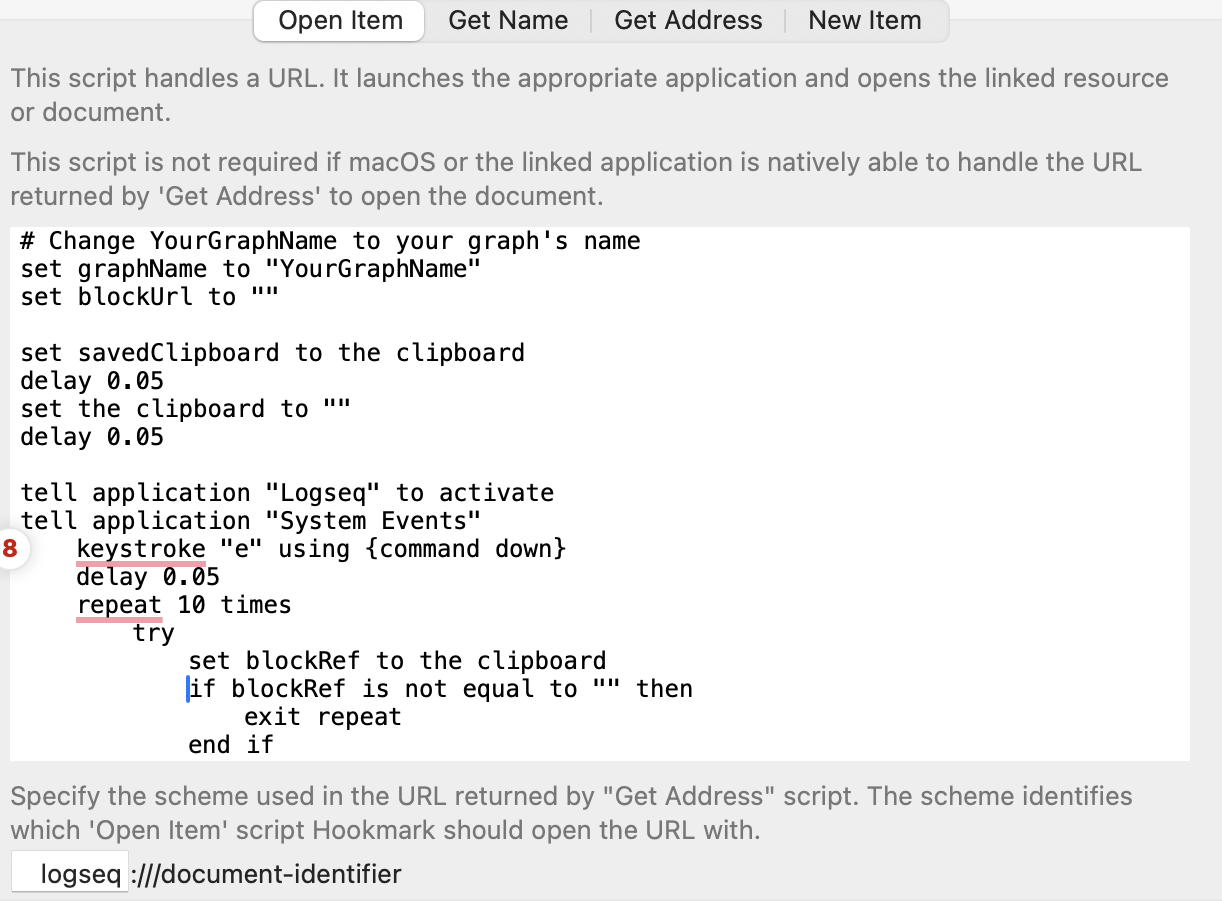
On the Logseq side, I modified the config.edn as follows (I added the last three rows):
 ;; :shortcuts
 ;; {:editor/new-block       "enter"
 ;;  :editor/new-line        "shift+enter"
 ;;  :editor/insert-link     "mod+shift+k"
 ;;  :editor/highlight       false
 ;;  :ui/toggle-settings     "t s"
 ;;  :editor/up              ["ctrl+k" "up"]
 ;;  :editor/down            ["ctrl+j" "down"]
 ;;  :editor/left            ["ctrl+h" "left"]
 ;;  :editor/right           ["ctrl+l" "right"]}
    :shortcuts {
      :editor/copy-embed "mod+shift+c"
     }
However, from Logseq, by pressing Command+Shift+H, I see “No linkable item found in Logseq”.
What was wrong?
Is there anything I miss?
Welcome to Hookmark forum, @nicfab .
Is there any error message in Hookmark window? Could you please post the screenshot of Hookmark window?
Thank you
@bchend Thank you for your reply.
I found a solution just now.
Now it works fine.
Great job figuring that out on your own!
1 Like