# No linkable item found in Devonthink
**URL:** https://discourse.hookproductivity.com/t/no-linkable-item-found-in-devonthink/1291
**Category:** Discussion & Help
**Created:** [February 26, 2020, 10:13pm UTC](https://discourse.hookproductivity.com/t/no-linkable-item-found-in-devonthink/1291 "2020-02-26T22:13:43Z")
**Posts on this page:** 9
**Page:** 1
### Author:  [@peedwards](https://discourse.hookproductivity.com/u/peedwards)
#### Post date: [February 26, 2020, 10:13pm UTC](https://discourse.hookproductivity.com/t/no-linkable-item-found-in-devonthink/1291/1 "2020-02-26T22:13:43Z")
I bought Hook to use with Devonthink and downloaded Hook yesterday. But everytime I try to use Hook with DT I get the message that “No linkable item with Devonthink”. I have the latest version of DT3 and Hook works OK with other apps. Can anypne help?
Thanks in advance
---
### Author:  [@RobTrew](https://discourse.hookproductivity.com/u/RobTrew)
#### Post date: [February 26, 2020, 11:39pm UTC](https://discourse.hookproductivity.com/t/no-linkable-item-found-in-devonthink/1291/2 "2020-02-26T23:39:25Z")
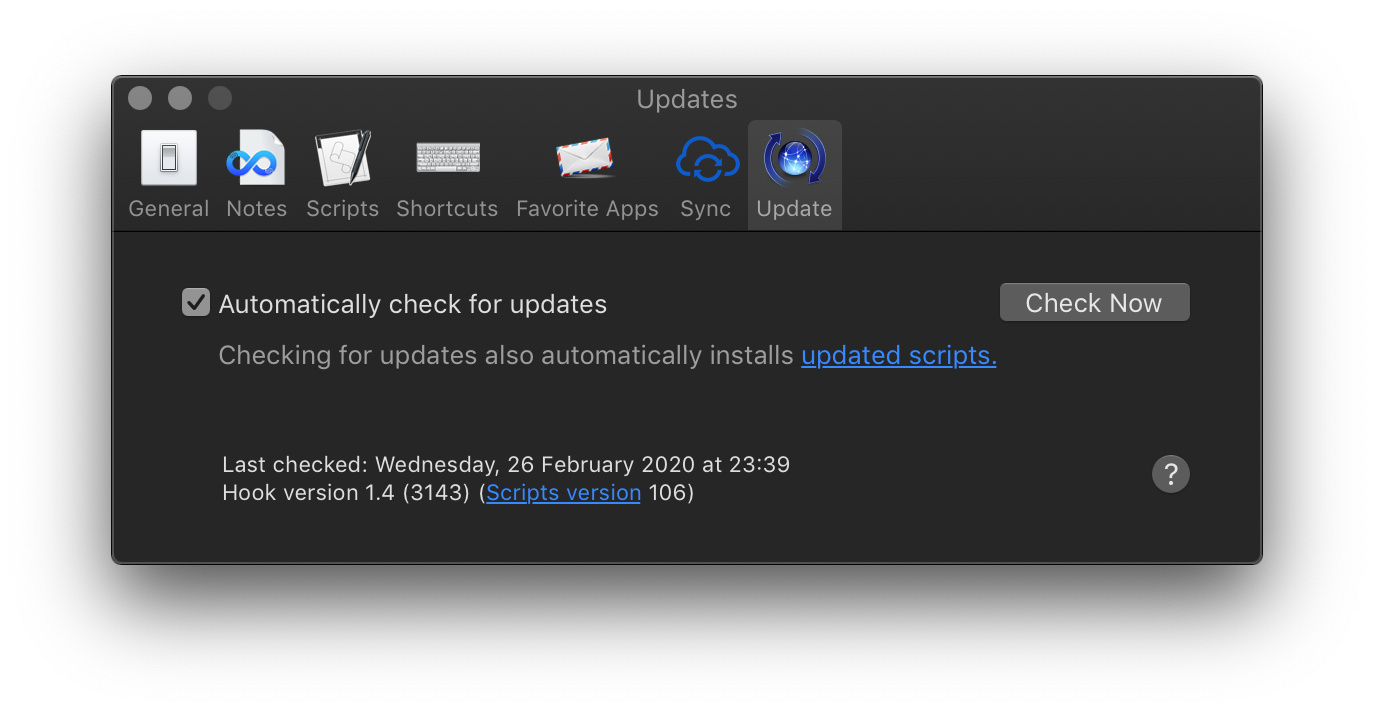
Might be worth running `Hook > Preferences > Updates > Check Now`, which ensures that you have the latest set of scripts for each application.
---
### Author:  [@quorm](https://discourse.hookproductivity.com/u/quorm)
#### Post date: [February 27, 2020, 3:13am UTC](https://discourse.hookproductivity.com/t/no-linkable-item-found-in-devonthink/1291/3 "2020-02-27T03:13:27Z")
You might be experiencing the same situation that another user had with Hook not working with Chrome. Substitute “DEVONthink” for “Chrome” and follow the advice.
> [@ReadCube Papers 2020 and Hook](https://discourse.hookproductivity.com/t/readcube-papers-2020-and-hook/1222/4):
>
> The first time you use Hook with Chrome you should have been prompted with this request for permission If you said no or didn’t see or ignored the request, then there would be no checkmark in this panel in System Preferences \> Security & Privacy \> Automation. You can click “Google Chrome” to get things right again.
---
### Author:  [@LucB](https://discourse.hookproductivity.com/u/LucB)
#### Post date: [February 27, 2020, 6:40am UTC](https://discourse.hookproductivity.com/t/no-linkable-item-found-in-devonthink/1291/4 "2020-02-27T06:40:32Z")
> [@peedwards](#):
>
> I bought Hook to use with Devonthink and downloaded Hook yesterday. But everytime I try to use Hook with DT I get the message that “No linkable item with Devonthink”. I have the latest version of DT3 and Hook works OK with other apps. Can anypne help?
welcome to the Hook Productivity Forum, @peedwards. Sorry you encountered a bump on the road. I’ve just run another test with Hook 1.4 (public version) in context of DT3 (3.0.4) and it works for me.
Are you still having an issue after checking automation and scripts, per the comments above?
---
### Author:  [@peedwards](https://discourse.hookproductivity.com/u/peedwards)
#### Post date: [February 27, 2020, 10:02am UTC](https://discourse.hookproductivity.com/t/no-linkable-item-found-in-devonthink/1291/5 "2020-02-27T10:02:33Z")
Luc
Thank you. The DevonThink wasn’t checked in the panel in System Preferences \> Security & Privacy \> Automation. Seems to work now.
I am aiming to use Hook to support my History research - looks encouraging.
Peter
---
### Author:  [@holamigo](https://discourse.hookproductivity.com/u/holamigo)
#### Post date: [February 6, 2023, 1:36pm UTC](https://discourse.hookproductivity.com/t/no-linkable-item-found-in-devonthink/1291/6 "2023-02-06T13:36:11Z")
Hi there,
Sorry to bring this post alive, but as above mentioned, I find no Devonthink’s item in Preferences \> Security & Privacy \> Automation. It is said the Hookmark shall ask for permission when it works with devonthink for the first time but it did not ask for any permission except the first time when I opened the Hookmark.
I also tried to reinstall the Hookmark but it did not work.
Anyone has any solution would be much appreciated.
---
### Author:  [@LucB](https://discourse.hookproductivity.com/u/LucB)
#### Post date: [February 6, 2023, 10:04pm UTC](https://discourse.hookproductivity.com/t/no-linkable-item-found-in-devonthink/1291/7 "2023-02-06T22:04:58Z")
Welcome to the Hookmark Forum , @holamigo. Does the following tip from [No Linkable Item in … – Hookmark](https://hookproductivity.com/help/hook-window/no-resource-detected/) help?
> The macOS accessibility permissions database can get confused. In that case you might see strange behavior like not being able to disable or enable permissions for an app. In that case, you may reset Accessibility for Hookmark as follows:
>
> 1. `tccutil reset Accessibility com.cogsciapps.hook`
> 2. Reboot your Mac.
>
> For example: [Accessibility problem – Discussion & Help – Hookmark Forum](https://discourse.hookproductivity.com/t/accessibility-problem/3401/6).
---
### Author:  [@holamigo](https://discourse.hookproductivity.com/u/holamigo)
#### Post date: [February 7, 2023, 6:01am UTC](https://discourse.hookproductivity.com/t/no-linkable-item-found-in-devonthink/1291/8 "2023-02-07T06:01:50Z")
Not really, my problem happened in automation tab, not the accessibility tab. Resetting accessibility made hookmark asked again for permission for accessibility however not for automation.
[I described my problem in this post](https://discourse.hookproductivity.com/t/hookmark-does-not-request-access-to-automation-no-linkable-item-found-in-x/6336)
---
### Author:  [@LucB](https://discourse.hookproductivity.com/u/LucB)
#### Post date: [February 7, 2023, 4:18pm UTC](https://discourse.hookproductivity.com/t/no-linkable-item-found-in-devonthink/1291/9 "2023-02-07T16:18:55Z")
The issue and solution are documented in a different topic updated this morning:
> [@Hookmark does not request access to automation (no linkable item found in X)](https://discourse.hookproductivity.com/t/hookmark-does-not-request-access-to-automation-no-linkable-item-found-in-x/6336/11):
>
> Thank you for your kindest help. I finally resovled it by **resetting NVRAM** , all applications need permission now prompt to request. To reset NVRAM, just input `NVRAM -c` in terminal or in the terminal of recovery mode (in my case I used the latter) and reboot the mac. It will report an error but doesn’t matter and it should do it.
>
> It turns out to be neither Hookmark’s nor macOS’s problem, but my problem.