# Hookmark does not start
**URL:** https://discourse.hookproductivity.com/t/hookmark-does-not-start/7187
**Category:** Bug Reports
**Created:** [September 23, 2023, 9:35am UTC](https://discourse.hookproductivity.com/t/hookmark-does-not-start/7187 "2023-09-23T09:35:06Z")
**Posts on this page:** 11
**Page:** 1
### Author:  [@rainerc](https://discourse.hookproductivity.com/u/rainerc)
#### Post date: [September 23, 2023, 9:35am UTC](https://discourse.hookproductivity.com/t/hookmark-does-not-start/7187/1 "2023-09-23T09:35:06Z")
I have upgraded to MacOS Sonora 13.6 today and since then Hookmark does not start anymore. It hangs displaying this dialog:
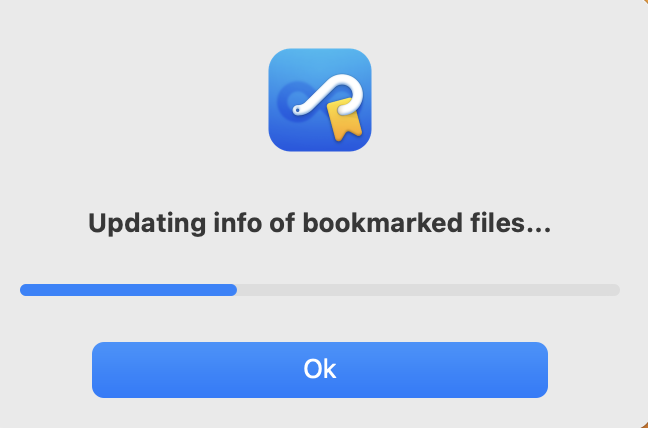
The progress bar does not move and I cannot even open Hookmark to edit preferences or anything else. The shortcut I used for Hookmark (^H) all the time does not work either anymore. If I click on the Hookmark icon in the menu bar ActivityMonitor displays: “HookMark (not responding)”.
I could try to re-install HookMark but am afraid to loose all my Hook-Links.
EDIT: After a **long** time (about 20 minutes) the “Updating info” dialog vanished and Hookmark worked as expected. But 20 minutes ???
---
### Author:  [@bchend](https://discourse.hookproductivity.com/u/bchend)
#### Post date: [September 23, 2023, 3:43pm UTC](https://discourse.hookproductivity.com/t/hookmark-does-not-start/7187/2 "2023-09-23T15:43:35Z")
Sorry about this issue.
What’s your Hookmark’s version?
Does it happen every time you start Hookmark or it is just one time thing?
How many bookmarks do you have?
Do you have network drive?
Thank you and sorry for so many questions
---
### Author:  [@rainerc](https://discourse.hookproductivity.com/u/rainerc)
#### Post date: [September 23, 2023, 8:10pm UTC](https://discourse.hookproductivity.com/t/hookmark-does-not-start/7187/3 "2023-09-23T20:10:27Z")
Version: 5.1.3
Frequency: happens all the time
Bookmarks: 2757
network drives: yes, several, I connect them from time to time, but no bookmarks pointing to them (I guess). But a **lot of** the bookmarks point to paths in my OneDrive folder. Maybe those are the reason for the slow response?
---
### Author:  [@bchend](https://discourse.hookproductivity.com/u/bchend)
#### Post date: [September 23, 2023, 10:04pm UTC](https://discourse.hookproductivity.com/t/hookmark-does-not-start/7187/4 "2023-09-23T22:04:49Z")
If you exclude all the network drives, will that make any difference?
You can exclude them here: Hookmark preferences window -\>Advanced.
Thank you
---
### Author:  [@ciapin](https://discourse.hookproductivity.com/u/ciapin)
#### Post date: [September 26, 2023, 8:31pm UTC](https://discourse.hookproductivity.com/t/hookmark-does-not-start/7187/5 "2023-09-26T20:31:42Z")
I had the same problem after installing Sonoma.
In my case the problem was iCloud Drive. I sync Hookmark with iCloud and after the macOS update the sync Hookmark folder was not fully downloaded yet.
I “forced downloaded” that folder (right-click on it and choose “Download Now”, give it some time and everything works seamlessly as before.
I hope you’re having the same issue as me. Best of luck!
---
### Author:  [@danieljomphe](https://discourse.hookproductivity.com/u/danieljomphe)
#### Post date: [September 27, 2023, 11:35am UTC](https://discourse.hookproductivity.com/t/hookmark-does-not-start/7187/6 "2023-09-27T11:35:34Z")
To let others know: there are also positive upgrade stories - I installed Sonoma last night and when I opened up Hoomark this morning (I don’t start it on boot), it started just fine.
I, too, use iCloud sync, and either the synced folder was already in sync, or the computer was already done syncing it.
---
### Author:  [@rainerc](https://discourse.hookproductivity.com/u/rainerc)
#### Post date: [September 29, 2023, 12:48pm UTC](https://discourse.hookproductivity.com/t/hookmark-does-not-start/7187/7 "2023-09-29T12:48:33Z")
getting worse as I described here: [Hookmark 5 hangs on "updating info of bookmarked files..."](https://discourse.hookproductivity.com/t/hookmark-5-hangs-on-updating-info-of-bookmarked-files/6213)
Now it takes hours: HookMark active in Acitivity monitor (memory for HookMark up to 160 MB after 6 hours) but I cannot open HookMark as it is still initializing. Even getting to the preference settings in HookMark is not possible as the application is still initializing. No network drives connected, 1772 items in the HookMark “aliases”-folder.
This is so frustrating!
HELP!!!
---
### Author:  [@bchend](https://discourse.hookproductivity.com/u/bchend)
#### Post date: [September 29, 2023, 3:08pm UTC](https://discourse.hookproductivity.com/t/hookmark-does-not-start/7187/8 "2023-09-29T15:08:21Z")
Sorry about this issue.
Could you please try the following:
(1)Quit Hookmark in Activity Monitor.
(2)Open Finder, Click Menu Go → Go to Folder…, copy and paste the following text into the input box and hit enter:
~/Library/Application Support
(3)Rename the folder com.cogsciapps.hook to com.cogsciapps.hook.old
(4)Restart Hookmark
(5)Turn on sync in Hookmark preferences window
Let Hookmark runs for some time and see how it goes.
Thank you
---
### Author:  [@rainerc](https://discourse.hookproductivity.com/u/rainerc)
#### Post date: [September 29, 2023, 3:30pm UTC](https://discourse.hookproductivity.com/t/hookmark-does-not-start/7187/9 "2023-09-29T15:30:07Z")
> [@bchend](#):
>
> and see how it goes
I followed your steps (did not need to turn on synch because it was already activated with option “iCloud”). Afterwards HookMark started incredibly fast and was accessible at once. Thank you so much!
What makes me wonder is: the folder “aliases” in the new com.cogsciapps.hook folder is empty. Doesn’t Hookmark need the old 1700 alias files?
---
### Author:  [@bchend](https://discourse.hookproductivity.com/u/bchend)
#### Post date: [September 29, 2023, 5:35pm UTC](https://discourse.hookproductivity.com/t/hookmark-does-not-start/7187/10 "2023-09-29T17:35:11Z")
Do your file bookmarks work properly? The folder “aliases” is not needed any more.
Thank you
---
### Author:  [@rainerc](https://discourse.hookproductivity.com/u/rainerc)
#### Post date: [September 29, 2023, 6:18pm UTC](https://discourse.hookproductivity.com/t/hookmark-does-not-start/7187/11 "2023-09-29T18:18:39Z")
I have tested a few bookmarks and they all work properly. Thanks again for your great help!