# Hook and Taskwarrior-tui
**URL:** https://discourse.hookproductivity.com/t/hook-and-taskwarrior-tui/4952
**Category:** Showcases and Use Cases
**Created:** [April 8, 2022, 12:59pm UTC](https://discourse.hookproductivity.com/t/hook-and-taskwarrior-tui/4952 "2022-04-08T12:59:45Z")
**Posts on this page:** 4
**Page:** 1
### Author:  [@rcraggs](https://discourse.hookproductivity.com/u/rcraggs)
#### Post date: [April 8, 2022, 12:59pm UTC](https://discourse.hookproductivity.com/t/hook-and-taskwarrior-tui/4952/1 "2022-04-08T12:59:45Z")
Hi, I recently manage to jerry-rig an integration between Hook and [Taskwarrior-tui](https://github.com/kdheepak/taskwarrior-tui) which is a interactive terminal interface for [Taskwarrior](https://taskwarrior.org/). I’m happy to provide more details if you’re interested, but in case nobody is I’ll keep my explanation brief.
1. I always run taskwarrior-tui in iTerm, so I have set up an integration script for iTerm in Hook.
2. The script runs a keyboard maestro script. (this is because I find shell scripting easier than applescripting. It’s possible that you could do this all in Applescript without needing KM.
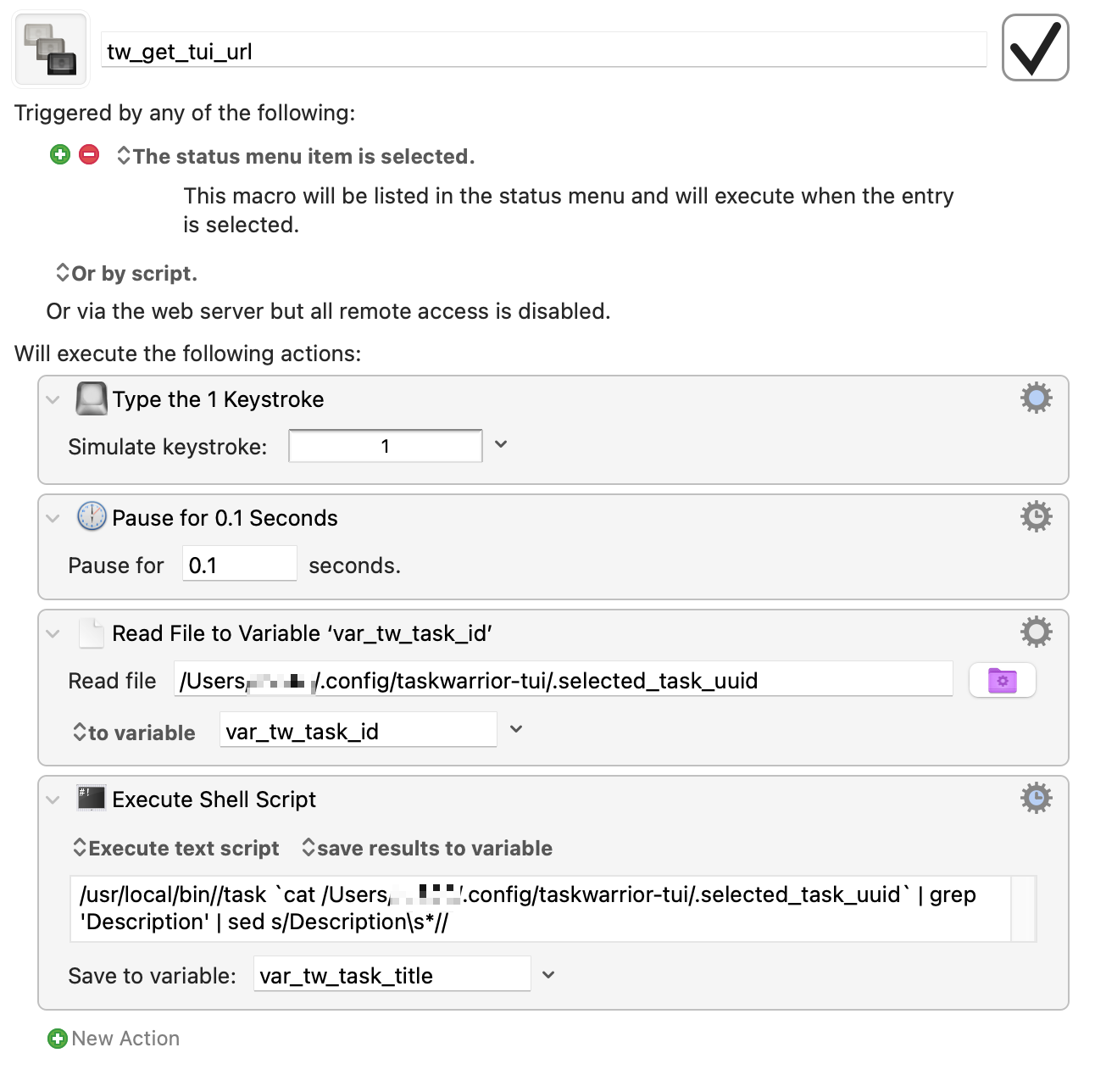
3. The KM script opens iTerm and presses ‘1’. Taskwarrior-tui is configured to run a custom script when 1 is pressed. This script simple dumps the GUID of the currently selected task to a known file path.
4. The KM Script then reads the GUID from this file, and runs taskwarrior to get the description of the task.
5. KM returns the description of the task and the GUID back to Hook’s script for it to form the URL.
Another trick is that I have a separate script that runs regularly to tag any taskwarrior tasks that have something hooked to them. This just uses Brett Terpstra’s [Hook CLI](https://github.com/ttscoff/hookapp) to get search the hook database for the GUIDs of active tasks and then add a tag. Then in the taskwarrior interface I can see which tasks have hooks attached.
---
### Author:  [@rcraggs](https://discourse.hookproductivity.com/u/rcraggs)
#### Post date: [April 8, 2022, 1:02pm UTC](https://discourse.hookproductivity.com/t/hook-and-taskwarrior-tui/4952/2 "2022-04-08T13:02:53Z")
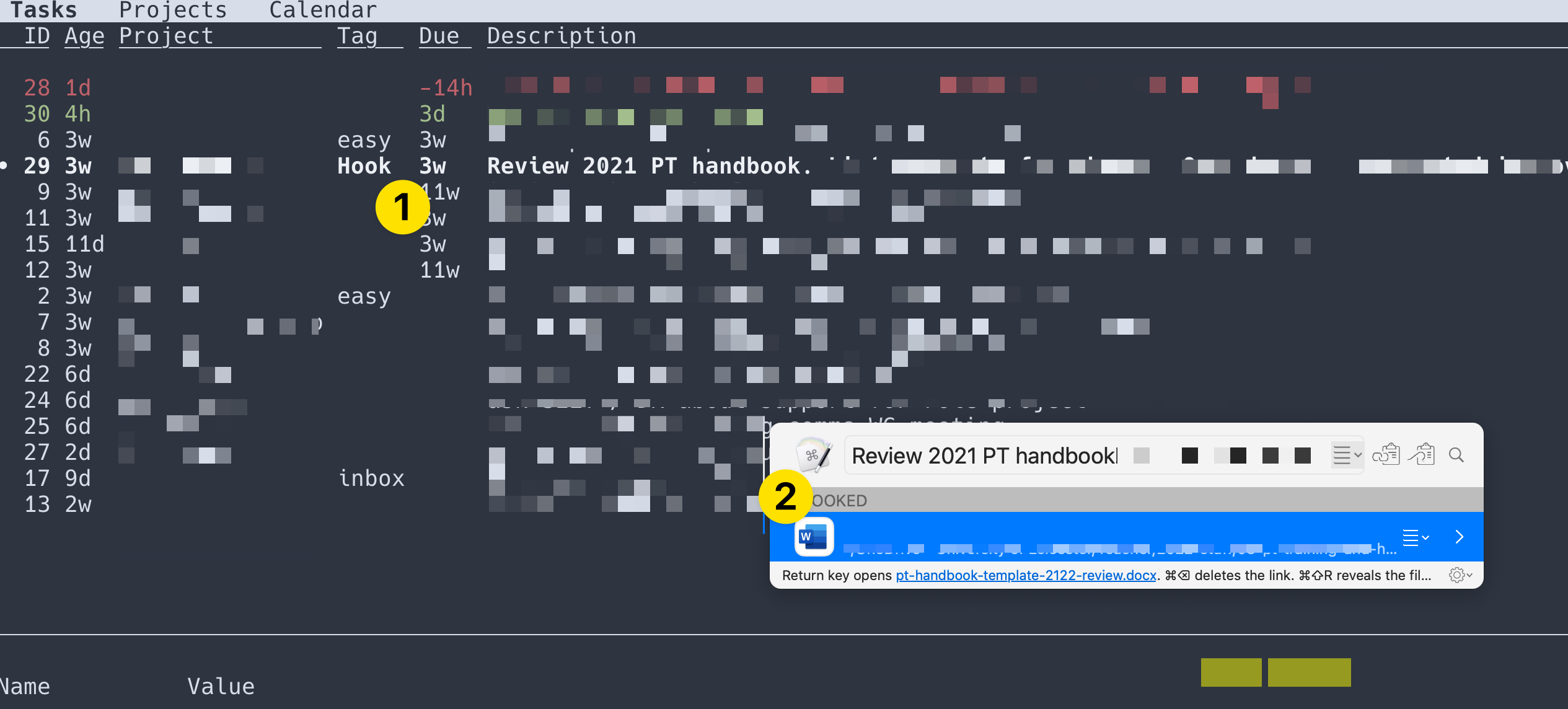
FWIW here is a screenshot of what it looks like. 1) is the tag showing there is a hook on this task, and 2) is showing that the task is linked to a word document
---
### Author:  [@LucB](https://discourse.hookproductivity.com/u/LucB)
#### Post date: [April 11, 2022, 1:13am UTC](https://discourse.hookproductivity.com/t/hook-and-taskwarrior-tui/4952/3 "2022-04-11T01:13:33Z")
Brilliant ! Thanks for sharing. Please feel free to share the source here. It’s a great concept.
---
### Author:  [@rcraggs](https://discourse.hookproductivity.com/u/rcraggs)
#### Post date: [April 11, 2022, 8:38am UTC](https://discourse.hookproductivity.com/t/hook-and-taskwarrior-tui/4952/4 "2022-04-11T08:38:07Z")
The source is pretty simple.
To make the ‘1’ key copy the selected task ID to a file, I added this to the `.taskrc` file
```auto
uda.taskwarrior-tui.shortcuts.1=~/.config/taskwarrior-tui/shortcut-scripts/capture_selected_uuid.sh
```
and this file contains just:
```bash
echo $1 > /Users/[ID]/.config/taskwarrior-tui/.selected_task_uuid
```
The Hook script is a bit nasty because “Get address” calls the keyboard maestro script and “Get name” assumes that that has already been run. If Hook decided to run these functions in a different order, then it would stop working.
```nohighlight
tell application "Keyboard Maestro Engine"
do script "tw_get_tui_url"
set taskID to getvariable "var_tw_task_id"
end tell
return "kmtrigger://macro=tw_open_task_by_uuid&value=" & taskID
```
```nohighlight
tell application "Keyboard Maestro Engine"
do script "tw_get_tui_name"
set taskText to getvariable "var_tw_task_title"
end tell
return taskText
```
Finally the keyboard maestro macro that is called when Hook is run for my iTerm terminal is