# Hook 3.6 public beta: "hooked" status can automatically be shown in menu bar icon
**URL:** https://discourse.hookproductivity.com/t/hook-3-6-public-beta-hooked-status-can-automatically-be-shown-in-menu-bar-icon/5144
**Category:** Releases
**Created:** [May 27, 2022, 5:30pm UTC](https://discourse.hookproductivity.com/t/hook-3-6-public-beta-hooked-status-can-automatically-be-shown-in-menu-bar-icon/5144 "2022-05-27T17:30:18Z")
**Posts on this page:** 3
**Page:** 1
### Author:  [@LucB](https://discourse.hookproductivity.com/u/LucB)
#### Post date: [May 27, 2022, 5:30pm UTC](https://discourse.hookproductivity.com/t/hook-3-6-public-beta-hooked-status-can-automatically-be-shown-in-menu-bar-icon/5144/1 "2022-05-27T17:30:18Z")
Hook Version 3.6 (4771) public beta is now [available for testing.](https://hookproductivity.com/release-notes/hook-3-6)
### Hooked status
🎁 The **“hooked” status** of the foreground item can now automatically be shown in menu bar icon! If enabled in General preferences, the menu bar icon will show this regardless of whether Hook’s contextual window is open. For instance, if you select a hooked file in Finder Hook’s menu bar icon will have a green contour. If you then select a file that is not hooked to anything, the menu bar icon will revert to black & white. This color scheme matches the scheme you see when you drag and drop files onto Hook’s menu bar icon.
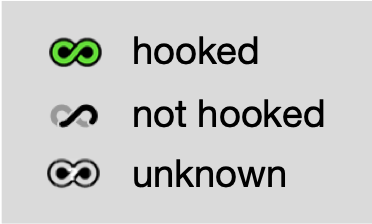
This currently only works for apps that are are linkable via AppleScript. That’s because you don’t want Hook to interact with apps’ UIs (user interfaces) while you’re using them. Also, linked via x-callback-url are not yet supported by this feature.
You can disable this feature in Hook’s General preferences or via Terminal defaults. You can also control Hook’s polling interval via the command line.
_Please let us know if you encounter any issue with this build._
### Agenda is now supported via automation
Thanks to the kind folks at Momenta B.V. for adding an x-callback-url API for linking [Agenda - Date-focused Note Taking](https://agenda.com/), Agenda is now linked via automation! Linking is therefore more reliable, and available in any natural language supported by Agenda.
This integration requires [Agenda Version 14.1](https://agenda.community/t/release-notes/34763/55).
`Hook to New > Agenda` is not yet supported, however stay tuned 😉 for that.
### Release notes
For more information, including fixes in this release, please see [Hook 3.6 Public Beta release notes](https://hookproductivity.com/release-notes/hook-3-6). That page also says a few words about additions coming to Hook 3.6.
Hook’s in-app update mechanism only notifies users of golden masters, not of its betas. So, to be informed whether there is another 3.6 public beta, please subscribe to this topic.
---
### Author:  [@LucB](https://discourse.hookproductivity.com/u/LucB)
#### Post date: [June 3, 2022, 7:17pm UTC](https://discourse.hookproductivity.com/t/hook-3-6-public-beta-hooked-status-can-automatically-be-shown-in-menu-bar-icon/5144/2 "2022-06-03T19:17:43Z")
Closing this topic in favor of [topic about Hook 3.6 golden master release](https://discourse.hookproductivity.com/t/hook-version-3-6-4781-219-is-available-hooked-status-updated-agenda-support-and-more/5178).
---
### Author:  [@LucB](https://discourse.hookproductivity.com/u/LucB)
#### Post date: [June 3, 2022, 7:18pm UTC](https://discourse.hookproductivity.com/t/hook-3-6-public-beta-hooked-status-can-automatically-be-shown-in-menu-bar-icon/5144/3 "2022-06-03T19:18:08Z")