# FileMaker and Hook
**URL:** https://discourse.hookproductivity.com/t/filemaker-and-hook/1629
**Category:** Hookmark Feature Requests
**Created:** [June 27, 2020, 10:49pm UTC](https://discourse.hookproductivity.com/t/filemaker-and-hook/1629 "2020-06-27T22:49:34Z")
**Posts on this page:** 20
**Page:** 1
### Author:  [@pubay](https://discourse.hookproductivity.com/u/pubay)
#### Post date: [June 27, 2020, 10:49pm UTC](https://discourse.hookproductivity.com/t/filemaker-and-hook/1629/1 "2020-06-27T22:49:35Z")
I would like to be able to paste Hook links into individual records of a FileMaker database, but this does not seem to be possible at the moment. Is there any possibility of being able to do this?
---
### Author:  [@stevelw](https://discourse.hookproductivity.com/u/stevelw)
#### Post date: [June 28, 2020, 1:43pm UTC](https://discourse.hookproductivity.com/t/filemaker-and-hook/1629/2 "2020-06-28T13:43:17Z")
I’m not following — what is happening when you try to do this currently?
---
### Author:  [@pubay](https://discourse.hookproductivity.com/u/pubay)
#### Post date: [June 28, 2020, 7:30pm UTC](https://discourse.hookproductivity.com/t/filemaker-and-hook/1629/3 "2020-06-28T19:30:39Z")
I should have been clearer—the link is pasted but only as plain text, and does not behave like a link. Or am I missing something?
---
### Author:  [@stevelw](https://discourse.hookproductivity.com/u/stevelw)
#### Post date: [June 28, 2020, 8:46pm UTC](https://discourse.hookproductivity.com/t/filemaker-and-hook/1629/4 "2020-06-28T20:46:45Z")
This is a FileMaker limitation — [only certain protocols are recognised](https://fmhelp.filemaker.com/help/16/fmp/en/index.html#page/FMP_Help/urls-in-a-field.html) for some reason.
You could ask FileMaker to support all protocols the system recognises. As a work around you could probably add a button by the field that opens the URL (been a while but I’m sure there must be a function in FM to pass a string to the web browser or open any URL directly).
---
### Author:  [@pubay](https://discourse.hookproductivity.com/u/pubay)
#### Post date: [June 28, 2020, 10:42pm UTC](https://discourse.hookproductivity.com/t/filemaker-and-hook/1629/5 "2020-06-28T22:42:26Z")
I’m sure you are right. Until now I have been linking to other files via a “container field,” but I thought it would be nice to be able to use Hook links without using a special field.
---
### Author:  [@stevelw](https://discourse.hookproductivity.com/u/stevelw)
#### Post date: [June 29, 2020, 3:44am UTC](https://discourse.hookproductivity.com/t/filemaker-and-hook/1629/6 "2020-06-29T03:44:20Z")
The list of protocols says file:// is supported. That means you could insert URLs for Hook files and they’ll be clickable — which then allows you to link to anything without a special field.
---
### Author:  [@pubay](https://discourse.hookproductivity.com/u/pubay)
#### Post date: [June 29, 2020, 4:21am UTC](https://discourse.hookproductivity.com/t/filemaker-and-hook/1629/7 "2020-06-29T04:21:44Z")
By URLs, do you mean a Hook link or something else? If the latter, I suspect that this discussion is moving beyond my capabilities and I will have to stick with a special field.
---
### Author:  [@stevelw](https://discourse.hookproductivity.com/u/stevelw)
#### Post date: [June 29, 2020, 6:47am UTC](https://discourse.hookproductivity.com/t/filemaker-and-hook/1629/8 "2020-06-29T06:47:04Z")
This is slightly convoluted, but should be pretty quick once you’ve done it once.
If you have the [Pro](https://hookproductivity.com/buy/) version of Hook, you can:
1. First, setup the automator service described [here](https://www.igeeksblog.com/how-to-copy-file-folder-path-from-mac-finder/). Just need to do this once.
2. [Make a Hook file](https://hookproductivity.com/help/hook-window/make-hook-file/) instead of copying a Hook link (so, works on anything you’d normally use Hook for). So just open Hook then press SHIFT+CMD+H
3. When you have made the file it will automatically be revealed in Finder, where you can right-click and select the service you created in step 0.
4. Paste that link into FileMaker where you currently do.
Then, when you click the file:// link you put in FileMaker Hook will take you to wherever you Hooked to, even if those Hook links weren’t working in FileMaker previously. You could probably automate that whole thing if you wanted, but the above should be pretty low friction once setup.
---
### Author:  [@pubay](https://discourse.hookproductivity.com/u/pubay)
#### Post date: [June 29, 2020, 7:44pm UTC](https://discourse.hookproductivity.com/t/filemaker-and-hook/1629/9 "2020-06-29T19:44:25Z")
Many thanks for the detailed explanation. Unfortunately the link for the automator service does not appear to be working.
---
### Author:  [@LucB](https://discourse.hookproductivity.com/u/LucB)
#### Post date: [June 30, 2020, 3:14am UTC](https://discourse.hookproductivity.com/t/filemaker-and-hook/1629/10 "2020-06-30T03:14:24Z")
thanks, @pubay for asking, and @stevelw for answering.
Hook’s AppleScript does provide a `bookmark from url` that may be relevant. The bookmark contains three attributes: title, hook URL, and POSIX file path.
We intend to provide a `Copy file:// Link` which would be enabled when the Title or selected Link points to a file. The link’s URL’s scheme would be `file://`. The command would place Markdown, RTF and HTML variants in clipboard. We may also provide a “Copy Path” command which would work for all linkable resources.
---
### Author:  [@stevelw](https://discourse.hookproductivity.com/u/stevelw)
#### Post date: [June 30, 2020, 12:02pm UTC](https://discourse.hookproductivity.com/t/filemaker-and-hook/1629/11 "2020-06-30T12:02:11Z")
Sorry, had an extra character in link. Should work now.
---
### Author:  [@pubay](https://discourse.hookproductivity.com/u/pubay)
#### Post date: [June 30, 2020, 8:15pm UTC](https://discourse.hookproductivity.com/t/filemaker-and-hook/1629/12 "2020-06-30T20:15:38Z")
Thanks for all your help, but it still doesn’t work for me. The file path copied by the automator service doesn’t begin with “file://” and so isn’t recognized as a link by FM.
---
### Author:  [@stevelw](https://discourse.hookproductivity.com/u/stevelw)
#### Post date: [July 1, 2020, 8:22pm UTC](https://discourse.hookproductivity.com/t/filemaker-and-hook/1629/13 "2020-07-01T20:22:25Z")
> [@pubay](#):
>
> The file path copied by the automator service doesn’t begin with “file://” and so isn’t recognized as a link by FM
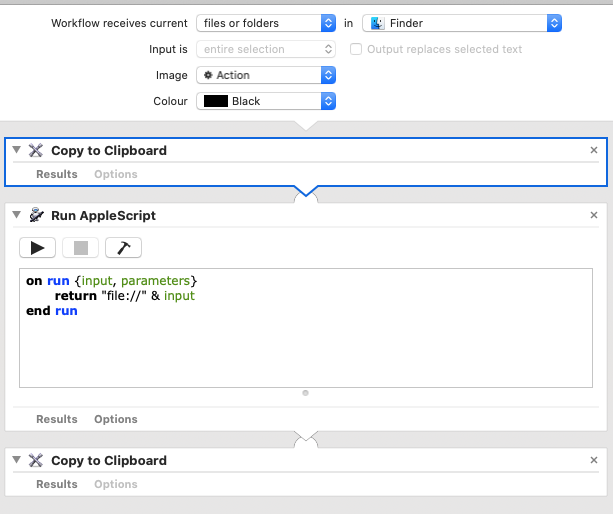
You’re right, they didn’t include that bit. [Here’s a macOS Quick Action](https://www.dropbox.com/s/84swdb4vo6u80b2/Copy%20file%20URL.workflow.zip?dl=0) (AKA Service) which will give you the URL for the currently selected file.
[How To: Install a macOS Service - BrettTerpstra.com](https://brettterpstra.com/howtos/install-an-os-x-system-service/)
---
### Author:  [@pubay](https://discourse.hookproductivity.com/u/pubay)
#### Post date: [July 1, 2020, 9:04pm UTC](https://discourse.hookproductivity.com/t/filemaker-and-hook/1629/14 "2020-07-01T21:04:11Z")
Many thanks. That now works, although I have to select the entire link, right-click, and then select the Quick Action.
---
### Author:  [@stevelw](https://discourse.hookproductivity.com/u/stevelw)
#### Post date: [July 1, 2020, 9:33pm UTC](https://discourse.hookproductivity.com/t/filemaker-and-hook/1629/15 "2020-07-01T21:33:05Z")
Im not sure what you’re doing — it should be a file you’re right-clicking and using the quick action on, not text.
---
### Author:  [@pubay](https://discourse.hookproductivity.com/u/pubay)
#### Post date: [July 2, 2020, 9:50pm UTC](https://discourse.hookproductivity.com/t/filemaker-and-hook/1629/16 "2020-07-02T21:50:43Z")
I meant that the link pasted into FM is not a clickable link and I have to select it before right-clicking.
---
### Author:  [@stevelw](https://discourse.hookproductivity.com/u/stevelw)
#### Post date: [July 3, 2020, 5:14pm UTC](https://discourse.hookproductivity.com/t/filemaker-and-hook/1629/17 "2020-07-03T17:14:50Z")
Hmm, file:// links should work in FM. Which version of FM are you running?
---
### Author:  [@pubay](https://discourse.hookproductivity.com/u/pubay)
#### Post date: [July 3, 2020, 7:29pm UTC](https://discourse.hookproductivity.com/t/filemaker-and-hook/1629/18 "2020-07-03T19:29:31Z")
I’m using File Maker 17.
---
### Author:  [@stevelw](https://discourse.hookproductivity.com/u/stevelw)
#### Post date: [July 4, 2020, 7:42am UTC](https://discourse.hookproductivity.com/t/filemaker-and-hook/1629/19 "2020-07-04T07:42:11Z")
I’ve just spotted in their documentation that in FM you can’t just click on a URL to open it for some reason, however:
> You can also hold down the Alt key (Windows) or the Command key (macOS) while clicking any part of the URL text to open the URL.
Which then means you won’t need to right click then select open from the menu.
---
### Author:  [@pubay](https://discourse.hookproductivity.com/u/pubay)
#### Post date: [July 4, 2020, 8:11pm UTC](https://discourse.hookproductivity.com/t/filemaker-and-hook/1629/20 "2020-07-04T20:11:53Z")
For some reason that doesn’t work for me. But in terms of time and effort, I don’t suppose that it is noticeably different from clicking three times to select the link.