# Custom Dashboard using Hook in OmniOutliner
**URL:** https://discourse.hookproductivity.com/t/custom-dashboard-using-hook-in-omnioutliner/4653
**Category:** Showcases and Use Cases
**Created:** [February 9, 2022, 6:15pm UTC](https://discourse.hookproductivity.com/t/custom-dashboard-using-hook-in-omnioutliner/4653 "2022-02-09T18:15:41Z")
**Posts on this page:** 6
**Page:** 1
### Author:  [@Prob](https://discourse.hookproductivity.com/u/Prob)
#### Post date: [February 9, 2022, 6:15pm UTC](https://discourse.hookproductivity.com/t/custom-dashboard-using-hook-in-omnioutliner/4653/1 "2022-02-09T18:15:41Z")
I’m posting this because I thought it might be useful to someone.
I routinely have a number of projects I’m working on, and during the day I find myself switching among various apps for each project.
I may open the Finder to look at a project’s folder, or consult the draft document I’ve been working on in OmniOutliner … or I might open up DevonThink where I keep that project’s research, or back to OmniOutliner where I process culls from the research … or even Apple Notes, where I keep a kind of daily log. It’s a lot of back and forth among apps, and then navigating inside each app to get to the right place, or Smart Group, or file, or database.
So I created a Dashboard in an OmniOutliner document.
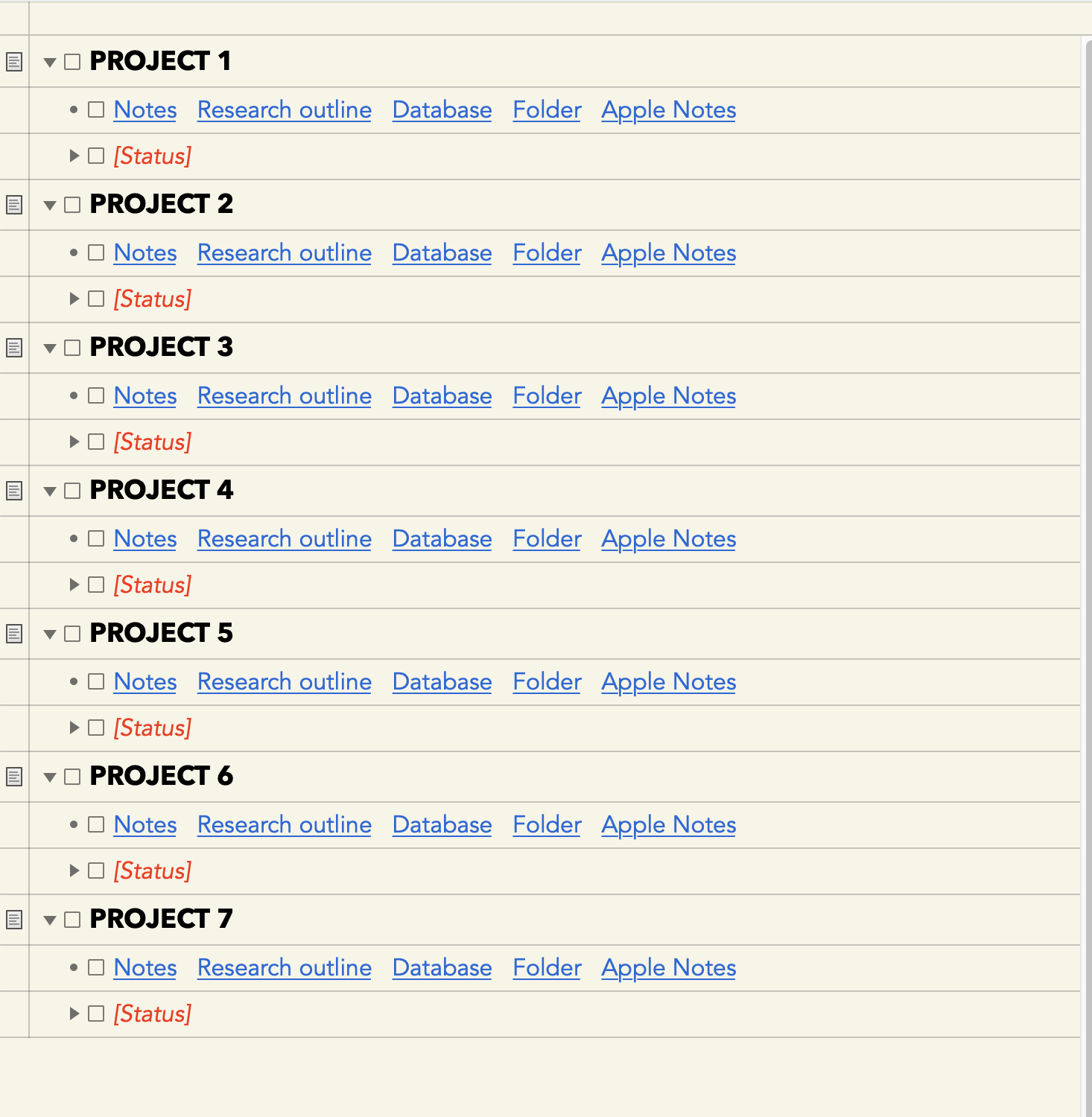
Under each project are links I’ve created in Hook to the specific files. One click gets me where I want to go. I keep the Dashboard open on the side of my desktop, and it’s made it a LOT easier to navigate among all the different aspects of the projects I need to juggle throughout the day.
The coolest Hook trick was getting Apple Notes to open showing only those items that have a specific project-related tag. I created a Keyboard Maestro macro that would open Notes and then filter for the tag. I saved that macro as a Trigger File, and then used Hook to link the trigger file to the dashboard.
I was particularly grateful to be able to rename all the links so that I wasn’t stuck with long filenames.
Hook is one great app, and I’m finding it to be endlessly useful and increasingly indispensable.
---
### Author:  [@LucB](https://discourse.hookproductivity.com/u/LucB)
#### Post date: [February 11, 2022, 10:15pm UTC](https://discourse.hookproductivity.com/t/custom-dashboard-using-hook-in-omnioutliner/4653/2 "2022-02-11T22:15:14Z")
Welcome to the Hook Productivity Forum , @Prob, and thanks for sharing that awesome way of organizing your work with Hook across all those apps.
---
### Author:  [@Prob](https://discourse.hookproductivity.com/u/Prob)
#### Post date: [February 11, 2022, 11:06pm UTC](https://discourse.hookproductivity.com/t/custom-dashboard-using-hook-in-omnioutliner/4653/3 "2022-02-11T23:06:05Z")
And thank you for a terrific app. I’m finding new uses for it all the time.
---
### Author:  [@Ruggill](https://discourse.hookproductivity.com/u/Ruggill)
#### Post date: [March 1, 2023, 12:09am UTC](https://discourse.hookproductivity.com/t/custom-dashboard-using-hook-in-omnioutliner/4653/4 "2023-03-01T00:09:08Z")
I would very much like to try this but don’t have a clue how to go about recreating it… Are you able to share the KM macro you created?
---
### Author:  [@Prob](https://discourse.hookproductivity.com/u/Prob)
#### Post date: [March 1, 2023, 12:29am UTC](https://discourse.hookproductivity.com/t/custom-dashboard-using-hook-in-omnioutliner/4653/5 "2023-03-01T00:29:52Z")
Happy to.
The Keyboard Maestro macro consists of 5 steps:
Open “/System/Applications/Notes.app”
Pause for .5 Seconds
Type the ⌥⌘F Keystroke
Pause for .5 Seconds
Insert Text “#[name of tag]” by Typing
Then I save that macro as a Trigger File, called “Open Apple Notes to #[name of tag]”.
I use Hookmark to create a link to that trigger file, then paste that link into my Dashboard, and then right-click to edit the name of the link to just the name of the tag.
Hope this helps.
---
### Author:  [@Ruggill](https://discourse.hookproductivity.com/u/Ruggill)
#### Post date: [March 1, 2023, 1:21am UTC](https://discourse.hookproductivity.com/t/custom-dashboard-using-hook-in-omnioutliner/4653/6 "2023-03-01T01:21:56Z")
Thank you! Much appreciated. I will give this a try.