# Creating a Hookmark file in the active folder location
**URL:** https://discourse.hookproductivity.com/t/creating-a-hookmark-file-in-the-active-folder-location/8247
**Category:** Hookmark Feature Requests
**Created:** [July 24, 2024, 6:16am UTC](https://discourse.hookproductivity.com/t/creating-a-hookmark-file-in-the-active-folder-location/8247 "2024-07-24T06:16:14Z")
**Posts on this page:** 7
**Page:** 1
### Author:  [@AutonomyGaps](https://discourse.hookproductivity.com/u/AutonomyGaps)
#### Post date: [July 24, 2024, 6:16am UTC](https://discourse.hookproductivity.com/t/creating-a-hookmark-file-in-the-active-folder-location/8247/1 "2024-07-24T06:16:14Z")
I’m finally appreciating the power of Hookmark files! My key use-case: I want to ensure that I don’t have duplicates for the articles that I use for my research, even though I may use the same article for two publications I’m writing, as well as for a seminar I’m teaching. So, I want my PDFs all in one folder. But what about the three other project folders? And, of course, I can use Hookmark to create links from the folder (or a key project-file in it) to the PDF in the big PDF folder. But it’s much (cognitively) preferable to actually see the filename of my PDF in the different project folders, to move it into sub-folders, delete it, etc. So, I now create a “Hookmark file” for the PDF, and put it (and its duplicates) in the relevant folders. That way, it looks like the file is there – I can see the informative file name “Author Year Title” and – and when I click on it (from anywhere!), I’m taken to the One True Location for the PDF. I love it.
Now the feature request: Sometimes, I’m working in a project folder (“Human Rights Seminar ay24”), and there is a file in a project folder that I want to also have appear in a different folder. What I would like to do is to invoke Hookmark to create a Hookmark file _ **in the folder I’m currently working in** _. That way, I’ve got it right there, and I can then use (in my case) Alfred to move the file elsewhere, while keeping the Hookmark file as a marker/placeholder.
What I have to do currently is leave the current folder, go to the folder of Hookmark files and then move the Hookmark file to a new location (often the folder where I just was). This strikes me as going again all of Luc’s key principles of Cognitive Productivity!
Any chance that it could be an option to create the Markdown file _in situ_? I’m going to try a workaround with Hazel putting any file that gets created in the folder of Hookmark files into my Yoink pasteboard, which will allow me to access it without leaving the folder. But that’s slow and cludgey.
---
### Author:  [@Tetoco](https://discourse.hookproductivity.com/u/Tetoco)
#### Post date: [July 29, 2024, 3:16pm UTC](https://discourse.hookproductivity.com/t/creating-a-hookmark-file-in-the-active-folder-location/8247/2 "2024-07-29T15:16:39Z")
I second your feature request.
Coincidentally, I use the exact same Hazel / Yoink workaround. To make it as quick as possible -quick enough for me-, I use conditional time setting “not in the last” 0.2 min. The inconvenient I find with the workaround is that I have to use a mouse to move the file; if I could do it all with the keyboard I’d be satisfied.
Cheers
---
### Author:  [@AutonomyGaps](https://discourse.hookproductivity.com/u/AutonomyGaps)
#### Post date: [July 29, 2024, 4:05pm UTC](https://discourse.hookproductivity.com/t/creating-a-hookmark-file-in-the-active-folder-location/8247/3 "2024-07-29T16:05:43Z")
What a coincidence! Could you perhaps share how you do it? Do you have Hazel run a script to put it in Yoink? Would you be willing to share the script?
I was thinking, it might be possible to run a Keyboard Maestro macro to do several things:
1. Set a variable for the current Finder folder.
2. Create a Hookmark file for a file.
3. Have Hazel run a script on the most recent file in the Hookmark folder, moving the file to the pathname variable.
Any ideas on what that script should be?
---
### Author:  [@Tetoco](https://discourse.hookproductivity.com/u/Tetoco)
#### Post date: [July 29, 2024, 4:23pm UTC](https://discourse.hookproductivity.com/t/creating-a-hookmark-file-in-the-active-folder-location/8247/4 "2024-07-29T16:23:24Z")
This is the rule in Hazel (no script)
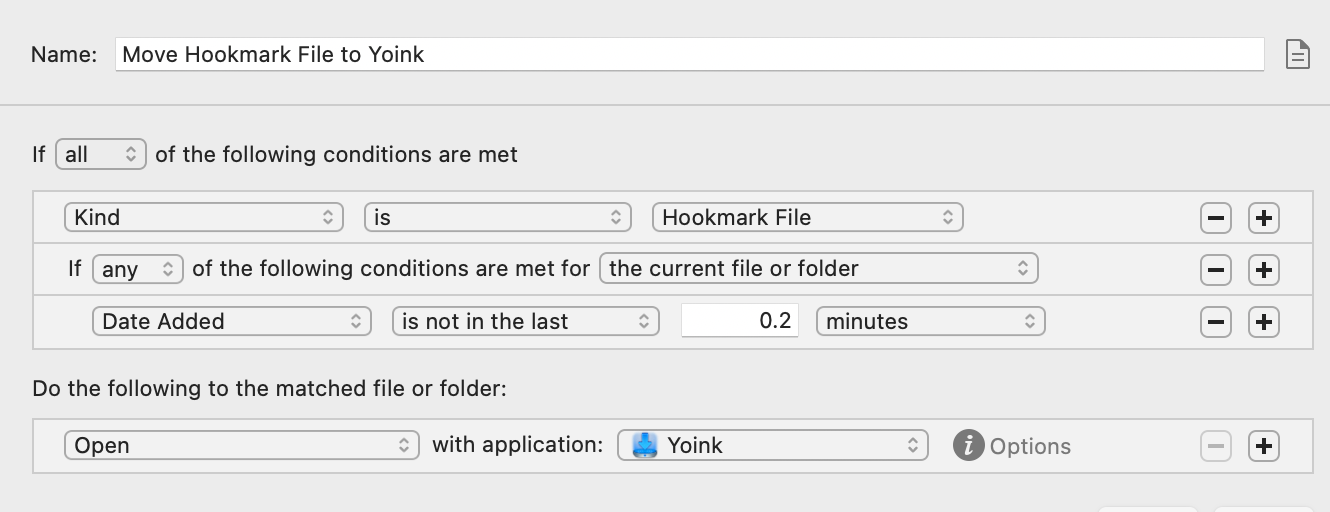
I haven’t tried in KM -perhaps mainly because I don’t have a script and Hazel does large part of what I need-.
---
### Author:  [@AutonomyGaps](https://discourse.hookproductivity.com/u/AutonomyGaps)
#### Post date: [September 5, 2026, 1:27pm UTC](https://discourse.hookproductivity.com/t/creating-a-hookmark-file-in-the-active-folder-location/8247/5 "2026-09-05T13:27:44Z")
See the more elegant solution below [https://discourse.hookproductivity.com/t/creating-a-hookmark-file-in-the-active-folder-location/8247/6](https://discourse.hookproductivity.com/t/creating-a-hookmark-file-in-the-active-folder-location/8247/6)
This does work for me, but it’s probably overkill. I wish I’d been able to find that solution earlier.
* * *
I’ve finally gotten around to seeing if I can fix this myself. The following seems to be working for me, but – be forewarned, it’s vibe-coded (using Claude Fable 5.1)…
Follow-up on my own request, with a workaround that turned out to be simple enough that I no longer need the feature (though it would still be nice to have it built in).
The key observation: a Hookmark file is just a plain-text file whose entire content is the item’s `hook://` address. And Hookmark’s AppleScript dictionary will hand you that address for any file. So instead of asking Hookmark to create the file in the central “Hookmark Files” folder and then moving it, a small script can get the address and write the `.hookmark` file directly beside the original, in whatever folder you are working in.
Here is the script I use (saved as `~/bin/hookmark-file-here`, made executable). Given file paths, it writes `Name.ext.hookmark` next to each one. Given no arguments, it acts on the current Finder selection. `--to DIR` writes into a different folder instead.
```auto
#!/bin/bash
```
`# hookmark-file-here — create a Hookmark file (.hookmark) next to the original file`
`# Usage: hookmark-file-here [--to DIR] FILE... (no FILE: uses the Finder selection)`
`set -u`
`dest=""`
`if [["${1:-}" == "--to"]]; then dest="$2"; shift 2; fi`
`if [[$# -eq 0]]; then`
` while IFS= read -r p; do [[-n "$p"]] && set -- "$@" "$p"; done < <(`
` osascript -e 'tell application "Finder"`
` set out to ""`
` repeat with i in (get selection)`
` set out to out & (POSIX path of (i as alias)) & linefeed`
` end repeat`
` return out`
` end tell')`
`fi`
`[[$# -eq 0]] && { echo "no file given and nothing selected in Finder" >&2; exit 1; }`
`status=0`
`for src in "$@"; do`
` src="${src%/}"`
` [[-e "$src"]] || { echo "skip (not found): $src" >&2; status=1; continue; }`
` [["$src" == *.hookmark]] && { echo "skip (already a Hookmark file): $src" >&2; continue; }`
` url="file://$(python3 -c 'import sys,urllib.parse;print(urllib.parse.quote(sys.argv[1]))' "$src")"`
` addr=$(osascript -e "tell application \"Hookmark\" to get address of (make bookmark with properties {address:\"$url\"})" 2>&1)`
` [["$addr" == hook://*]] || { echo "Hookmark gave no address for $src: $addr" >&2; status=1; continue; }`
` dir="${dest:-$(dirname "$src")}"`
` base="$(basename "$src")"`
` out="$dir/$base.hookmark"`
` n=2`
` while [[-e "$out"]]; do out="$dir/$base ($n).hookmark"; n=$((n+1)); done`
` printf '%s' "$addr" > "$out" || { echo "could not write $out" >&2; status=1; continue; }`
` echo "$out"`
`done`
`exit $status`
Since I’m an avid user of Alfred for my launcher (and much more!), I wrapped it in an Alfred workflow: a Universal Action (“Make Hookmark file here”) that runs the script on the selected files, plus a keyword that acts on the Finder selection, ending in a notification. Any launcher that can run a shell script on selected files would do the same (Keyboard Maestro, a Shortcuts quick action, an Automator service).
So the flow for my use case is now: in Finder, I select a file, invoke the action, and the placeholder appears right there. Then I can decide: move the original file or move the Hookmark file. I checked that the Hookmark file still resolves after the original is moved, which is the whole point.
Two notes for anyone copying this. The file produced is byte-for-byte the same shape as one Hookmark makes itself, so it opens and behaves identically. And because the script calls `make bookmark`, Hookmark registers the file as a bookmark as a side effect, which is harmless and arguably what you want anyway.
---
### Author:  [@bchend](https://discourse.hookproductivity.com/u/bchend)
#### Post date: [September 9, 2026, 3:37pm UTC](https://discourse.hookproductivity.com/t/creating-a-hookmark-file-in-the-active-folder-location/8247/6 "2026-09-09T15:37:29Z")
@AutonomyGaps , I am not sure this will help.
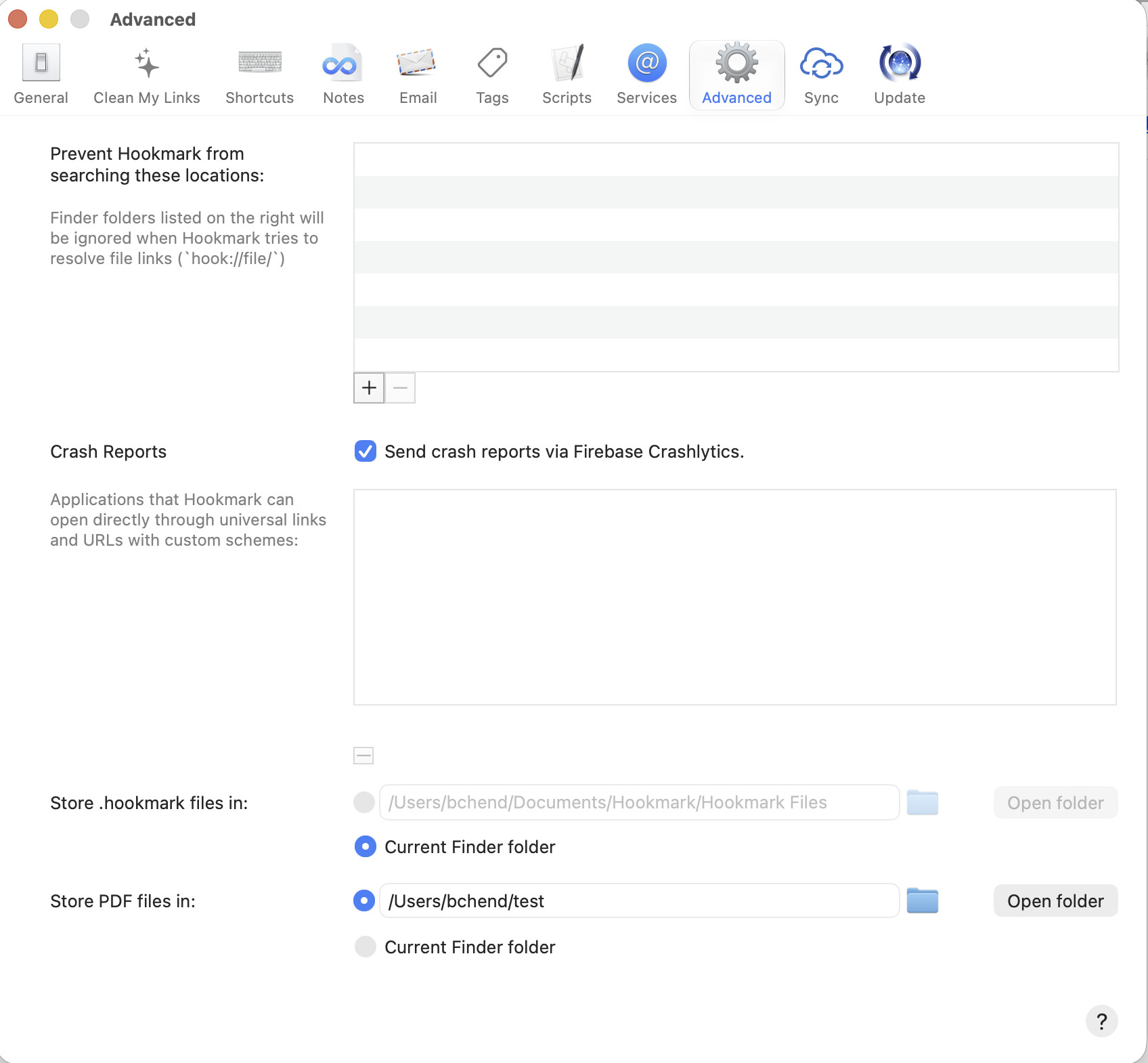
Currently, you can configure .hookmark files location in Hookmark Preferences window-\>Advanced-\>Store .hookmark files in: -\>Current Finder folder.
---
### Author:  [@AutonomyGaps](https://discourse.hookproductivity.com/u/AutonomyGaps)
#### Post date: [September 13, 2026, 1:41pm UTC](https://discourse.hookproductivity.com/t/creating-a-hookmark-file-in-the-active-folder-location/8247/7 "2026-09-13T13:41:39Z")
Thanks for pointing this out! It does make it much easier.