# Cannot automatically send link to Pinboard with keyboard shortcut
**URL:** https://discourse.hookproductivity.com/t/cannot-automatically-send-link-to-pinboard-with-keyboard-shortcut/3307
**Category:** Discussion & Help
**Created:** [May 23, 2021, 2:56am UTC](https://discourse.hookproductivity.com/t/cannot-automatically-send-link-to-pinboard-with-keyboard-shortcut/3307 "2021-05-23T02:56:39Z")
**Posts on this page:** 9
**Page:** 1
### Author:  [@thirstylizard](https://discourse.hookproductivity.com/u/thirstylizard)
#### Post date: [May 23, 2021, 2:56am UTC](https://discourse.hookproductivity.com/t/cannot-automatically-send-link-to-pinboard-with-keyboard-shortcut/3307/1 "2021-05-23T02:56:39Z")
If I use a two-step process, ie. invoke Hook by Shift-cmd spacebar, then cmd-C, it would automatically send URL to pinboard. But if I use shift-ctrl-cmd-C , it won’t work
Perhaps I misunderstood the keyboard shortcut steps?
---
### Author:  [@LucB](https://discourse.hookproductivity.com/u/LucB)
#### Post date: [May 23, 2021, 5:46pm UTC](https://discourse.hookproductivity.com/t/cannot-automatically-send-link-to-pinboard-with-keyboard-shortcut/3307/2 "2021-05-23T17:46:31Z")
I tested this again and it works for me. Sometimes it can take a few seconds for a bookmark to appear in Pinboard.
---
### Author:  [@Rob](https://discourse.hookproductivity.com/u/Rob)
#### Post date: [May 23, 2021, 7:20pm UTC](https://discourse.hookproductivity.com/t/cannot-automatically-send-link-to-pinboard-with-keyboard-shortcut/3307/3 "2021-05-23T19:20:12Z")
I’m confused. First, I see the same behavior that the original poster sees. Second, I don’t even see where the idea to use shift-ctrl-cmd-C comes from. I don’t see shift-ctrl-cmd-C in any of the menus, nor do I see it listed on the Shortcuts page. I feel like I missed the first part of a conversation somewhere along the way.
---
### Author:  [@LucB](https://discourse.hookproductivity.com/u/LucB)
#### Post date: [May 23, 2021, 7:29pm UTC](https://discourse.hookproductivity.com/t/cannot-automatically-send-link-to-pinboard-with-keyboard-shortcut/3307/4 "2021-05-23T19:29:02Z")
⌃⇧⌘C is an optional global keyboard shortcut for Title menu \> `Copy Link`, that can be used without showing the Hook window.
[Shortcuts Tab – Hook](https://hookproductivity.com/help/preferences/shortcuts/)
The command is there but the actual shortcut keys are not listed in the documentation because they are likely to be configured by the user. Not operational by default.
---
### Author:  [@Rob](https://discourse.hookproductivity.com/u/Rob)
#### Post date: [May 23, 2021, 8:50pm UTC](https://discourse.hookproductivity.com/t/cannot-automatically-send-link-to-pinboard-with-keyboard-shortcut/3307/5 "2021-05-23T20:50:02Z")
Ahh, got it. But, when I use the shortcut I’ve assigned to that in the preferences, it copies the link to the clipboard correctly, but not to Pinboard. It works as expected, however, if I bring up the Hook title menu and copy the link from there,
---
### Author:  [@thirstylizard](https://discourse.hookproductivity.com/u/thirstylizard)
#### Post date: [May 24, 2021, 3:54am UTC](https://discourse.hookproductivity.com/t/cannot-automatically-send-link-to-pinboard-with-keyboard-shortcut/3307/6 "2021-05-24T03:54:46Z")
> [@Rob](#):
>
> But, when I use the shortcut I’ve assigned to that in the preferences, it copies the link to the clipboard correctly, but not to Pinboard.
@LucB so Rob’s result is the same as mine? ie. using ⌃⇧⌘C does not send to Pinboard by default? so it has to be a two step process, that is ⌘⇧SPACEBAR to show Hook Window, then Copy Link?
> [@LucB](#):
>
> The command is there but the actual shortcut keys are not listed in the documentation because they are likely to be configured by the user. Not operational by default.
I used the default global keyboard shortcut ⌃⇧⌘C , so this is not operational ?
---
### Author:  [@LucB](https://discourse.hookproductivity.com/u/LucB)
#### Post date: [May 24, 2021, 4:18am UTC](https://discourse.hookproductivity.com/t/cannot-automatically-send-link-to-pinboard-with-keyboard-shortcut/3307/7 "2021-05-24T04:18:06Z")
> [@thirstylizard](#):
>
> ie. using ⌃⇧⌘C does not send to Pinboard by default?
If enabled, it copies the link. Hook automatically bookmarks items that it copies, per [Universal, Effortless, Contextual, Networked Bookmarking.](https://hookproductivity.com/help/general/features/bookmark-manager/).
> [@thirstylizard](#):
>
> I used the default global keyboard shortcut ⌃⇧⌘C , so this is not operational ?
It needs to be enabled in the preferences panel (checkbox) to kick in. To verify whether ⌃⇧⌘C is working for you, please invoke it in the context of a web browser then go to TextEdit and paste it. If TextEdit is in RTF mode, then you’ll get a fully formatted link; if it is plaintext, you’ll get a URL.
---
### Author:  [@Rob](https://discourse.hookproductivity.com/u/Rob)
#### Post date: [May 24, 2021, 11:59am UTC](https://discourse.hookproductivity.com/t/cannot-automatically-send-link-to-pinboard-with-keyboard-shortcut/3307/8 "2021-05-24T11:59:30Z")
Just to be sure we are all on the same page here - my global shortcut is set here:
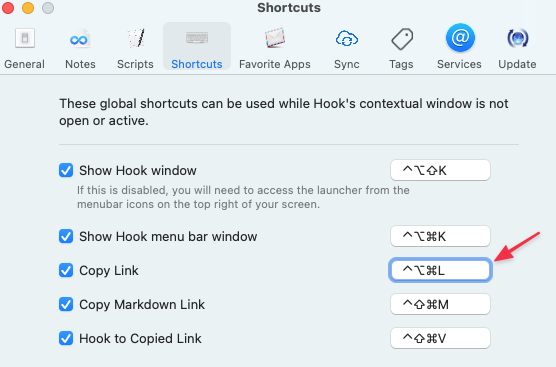
When I invoke the shortcut in Safari on this page and then do a paste into this reply, I get the fully formatted link:
[Cannot automatically send link to Pinboard with keyboard shortcut - Discussion & Help - Hook Productivity Forum](https://discourse.hookproductivity.com/t/cannot-automatically-send-link-to-pinboard-with-keyboard-shortcut/3307/6)
which is what I expect to get. But the link never gets to Pinboard, and it is not a question of waiting, because after I used the global shortcut, I went to another safari tab, did the two-step copy and that showed up in Pinboard almost instantaneously.
---
### Author:  [@LucB](https://discourse.hookproductivity.com/u/LucB)
#### Post date: [May 25, 2021, 3:45pm UTC](https://discourse.hookproductivity.com/t/cannot-automatically-send-link-to-pinboard-with-keyboard-shortcut/3307/9 "2021-05-25T15:45:07Z")
Many thanks for persisting and reporting. I’ve been able to reproduce the problem with the public 3.1 version of Hook. some hypotheses for the different results (where I could not reproduce it earlier)
- My prior test was with an internal (Hook 3.2) build;
- maybe I had inadvertently interacted with Hook such that it sent the add-bookmark request to Pinboard.
- maybe the timing of enabling the keyboard shortcut preference makes a difference.